
Add your app to bWallet
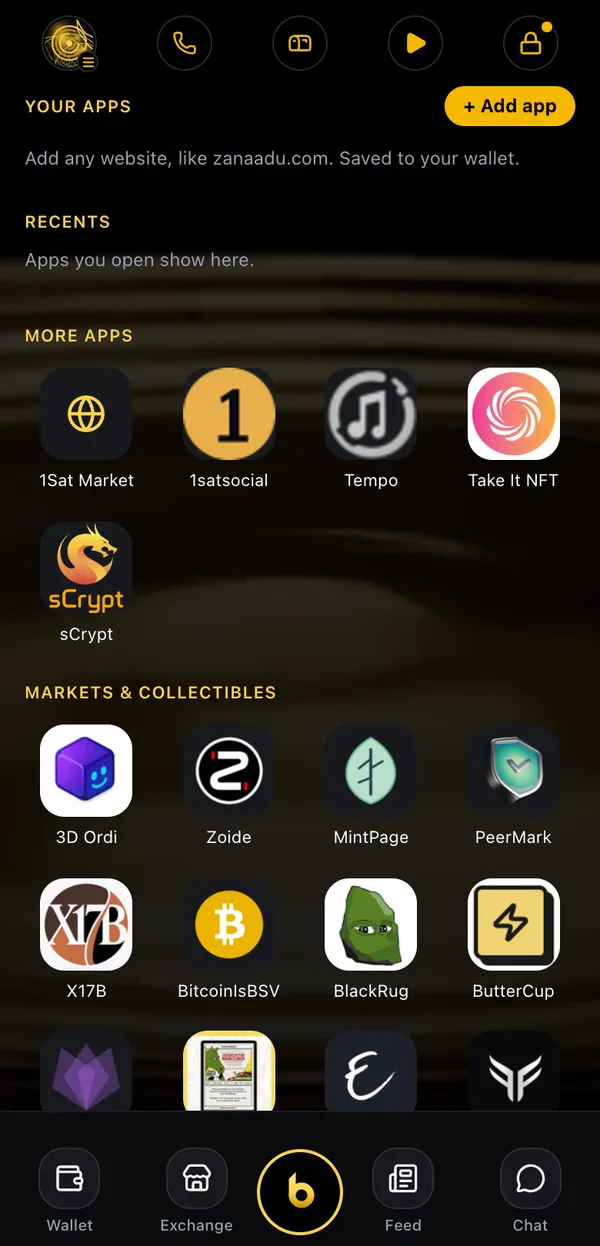
Built something on BSV? Put it on the Apps screen of bWallet and bWalletX, one tap away for everyone who opens the wallet. It's free, and a person reviews every app.
Why add it
One tap from the wallet
Your icon sits in Apps beside the other BSV apps. People open it without typing an address.
Sign-in is already there
Apps open in the wallet's own browser with the wallet connected (BRC-100). Ask for the user's identity key and you have a login, with no passwords to store.
Payments in BSV
Ask the wallet to pay and the user sees one approval sheet with the amount. No card forms, no accounts to set up.
Free
No listing fee and no cut of your sales. We check the app is safe, then add it.
What you need
- Your app's address, served over
https:// - A name (up to 40 characters) and a category
- An email address, so we can tell you when it's live (never shown)
- An icon: we take it from your site. An
apple-touch-icongives the sharpest tile. - Optional: a one-line description and a BSV address
What happens after you submit
- Your submission is saved for review. Nothing is listed straight away.
- A person opens your app and checks it against the list below.
- If it passes, we add it with your site's name, tagline and icon, and it ships in the next wallet release.
- We email you when it's in bWallet.
Want it on your own phone today? In the wallet, open Apps and tap + Add app. That adds any website to your own Apps screen straight away, saved to your wallet. It doesn't list it for anyone else.
Submit your app
What we check
It works and it's yours
The site loads over https, does what it says, and you made it or run it.
It's safe
No scams, no phishing, nothing asking for seed phrases or private keys, nothing illegal. Payments go through the wallet's approval screen, so users always see what they're paying.
Icon and name
We use your site's own icon and title. Add an apple-touch-icon for the best tile.
Status
- ✓This form saves your app for review
- ✓Every app is reviewed by a person before it's listed
- ✓Approved apps appear in Apps in bWalletX (web, extension, Android, iPhone) from the next release
- ✓Apps open in the wallet's browser with BRC-100 sign-in and payments
- ✓+ Add app in the wallet adds any site to your own Apps screen, instantly
- ◻Not yet: tips or revenue share to the BSV address you give us
- ◻Not yet: listing without waiting for a release
The App Store and Google Play edition (bWallet) may leave out some apps, such as exchanges and real-money games.
Connect to the wallet
Apps open in bWallet's built-in browser with the wallet available to them. See Developers to request payments, sign in with a wallet and read tokens.
Questions: support@bwalletx.com